Contents
- 1 What Exactly is the “EPFO Passbook Lite Version”?
- 2 The Old Way vs. The New Way: A World of Difference
- 3 Why Did EPFO Launch This New Portal?
- 4 Crucial: What You *Can’t* Do on the EPFO Passbook Lite Version
- 5 Who is this new portal for?
- 6 The Big Picture: A Smarter, More Citizen-Friendly EPFO
- 7 Conclusion: Your PF Balance is Now Just a Click Away
- 8 Frequently Asked Questions (FAQ)
- 8.0.1 1. What is the EPFO Passbook Lite Version?
- 8.0.2 2. How is this different from the main EPFO portal?
- 8.0.3 3. Is it faster to check PF balance online with the lite version?
- 8.0.4 4. How to check pf balance with UAN on the new portal?
- 8.0.5 5. Do I need a new login for the EPFO passbook login on the lite site?
- 8.0.6 6. Can I file a PF claim on the EPFO Passbook Lite Version?
We’ve all been there. You get your salary slip, and you feel that familiar urge to see your savings grow. You decide to quickly check your EPF balance. You open the EPFO member passbook portal, and… “Service Temporarily Unavailable.” You try again. It’s slow. You finally get to the login page, enter your UAN, password, and the impossible-to-read captcha, hit submit, and… the page times out. It’s a uniquely frustrating experience, trying to access *your own money* on a portal that feels like it’s buckling under its own weight. For years, the simple task to check PF balance online has felt like a gamble.
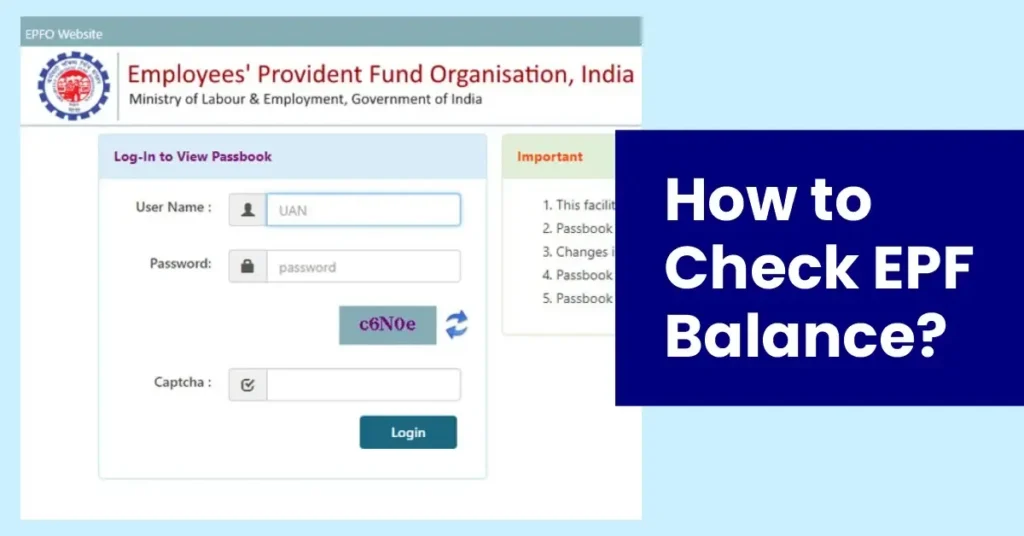
Well, it seems the Employees’ Provident Fund Organisation (EPFO) has finally heard our collective groans. In a truly massive win for user convenience, they have launched the “EPFO Passbook Lite” portal. This isn’t just a minor update; it’s a completely separate, streamlined, and lightning-fast website designed to do one single thing: let you check PF balance online without the wait. This is the simple, no-fuss solution we’ve all been waiting for, and this guide will tell you everything you need to know about this game-changing new tool.
What Exactly is the “EPFO Passbook Lite Version”?
Think of the main EPFO Unified Member Portal as a massive, all-in-one shopping mall. You can do everything there: file a claim, update your KYC, transfer your PF from an old account, check your pension status, and, yes, also check your balance. Because it does so much, it’s incredibly heavy and slow, leading to those infamous server-load crashes, especially during peak times (like when annual interest is credited).
The new EPFO passbook lite version is like a dedicated, high-speed “express counter” at that mall. It has only one job: to show you your passbook. It strips away all the other complex functions – no claims, no transfers, no KYC updates. By doing this, it creates a lightweight, incredibly fast-loading webpage that doesn’t crash. It’s the perfect solution for the 90% of us who just want to quickly check PF balance online and get on with our day.
The Old Way vs. The New Way: A World of Difference
The traditional method for an EPFO passbook login on the main portal was a test of patience. You’d log in and often be met with a complex dashboard, multiple links, and pop-ups about e-nominations or Aadhaar linking before you could even find the passbook link. It was clunky and confusing.
The new EPFO passbook lite version scraps all of that. The homepage is clean. It has one purpose. You log in, you see your balance. That’s it. The user experience is designed to be mobile-first and instantaneous. This makes it the best new way to check PF balance online, hands down.
How to Use the New EPFO Passbook Lite Portal (Step-by-Step)
The process is beautifully simple. This is essentially how to check pf balance with UAN using the new, faster method.
- Visit the New Portal: Your first step is to navigate to the new official lite portal website. (The government will publicize this URL; be wary of fake sites and always trust official EPFO communications).
- The Login Page: You will see a simple login screen. This is your new EPFO passbook login point.
- Enter Your Credentials: You will need your:
- Universal Account Number (UAN)
- Password (the same one you use for the main EPFO portal)
- Security Captcha
- Click ‘Login’: That’s it. There are no other hoops to jump through.
- View Your Passbook: The site will instantly load your member passbook page. You can select your Member ID (if you have multiple) and click “View Passbook (New)” to see your latest balance, including the most recent interest and contributions.
The entire process to check PF balance online using this new portal takes seconds, not minutes. It’s a revolutionary improvement in user experience.
Why Did EPFO Launch This New Portal?
This move is both smart and strategic, born from necessity. The primary reason is to manage the immense server load.
Reducing the Strain on Core Infrastructure
The vast majority of traffic to the main EPFO portal comes from users who just want to check their balance. This simple “read” request was clogging up the same servers that needed to process complex “write” requests, like claim settlements and KYC updates. This is a bit like a superhighway being jammed with people just looking at the view, while ambulances (the claims) are stuck in the traffic.
By creating a separate, lightweight portal, EPFO has intelligently diverted all the “read-only” traffic. This makes the EPFO passbook lite version incredibly fast for users, and it also frees up the main, heavy-duty portal to process complex claims more efficiently. It’s a win-win for everyone.
A Push for Mobile-First Convenience
This also reflects a “Digital India” push towards mobile-first services. The old portal was notoriously difficult to use on a mobile browser. The new lite version is designed to be clean, responsive, and perfectly usable on a smartphone, which is where most Indians access the internet. This aligns with other government initiatives to make services more accessible, like the push for a Unified ID update portal India to manage all your documents in one place.
Crucial: What You *Can’t* Do on the EPFO Passbook Lite Version
This is a critical point to understand to avoid confusion. This new portal is *not* a replacement for the main Unified Member Portal. It is a companion tool with a specific, limited function.
You cannot use the lite portal for:
- Filing any type of PF withdrawal claim (Advance, Form 19, Form 10C)
- Updating your Bank KYC or Aadhaar/PAN details
- Filing an e-nomination
- Transferring PF from an old account to a new one
- Checking your pension (EPS) status
For all these “actionable” tasks, you must still log in to the full-featured Unified Member Portal. The EPFO passbook lite version is for *viewing* your balance, and that’s all. But it does that one job perfectly.
Who is this new portal for?
This tool is a blessing for almost every EPF member, but especially for:
- The Curious Saver: If you’re someone who likes to check PF balance online regularly (e.g., after your salary is credited or when interest is announced), this is your new default website.
- Salaried Employees: You can quickly verify that your employer has deposited their monthly contribution without navigating the complex main site.
- Financial Planners: People who are planning their finances and just need to note their current PF corpus for their net worth calculation.
- Low-Connectivity Users: If you are in an area with a poor or slow internet connection, this lightweight site is much more likely to load successfully.
Essentially, this new way to check PF balance online will likely become the standard for 9 out of 10 times you interact with the EPFO portal.
The Big Picture: A Smarter, More Citizen-Friendly EPFO
This move, while seemingly small, signals a larger, positive trend in how government-run financial bodies are thinking about user experience. It’s an admission that a one-size-fits-all portal is inefficient. It shows a move towards building specialized tools for specific tasks, which is a much smarter way to design digital infrastructure.
This kind of simplification is vital. When systems are complex, people make mistakes or get frustrated. A simple, clear process empowers users. It’s the same logic behind making KYC rules clearer (as seen in the new simplified KYC process SBI is adopting) or making your travel documents universally valid. It’s about removing bureaucratic friction from citizens’ lives. The new `EPFO passbook login` is a perfect example of this philosophy in action.
Conclusion: Your PF Balance is Now Just a Click Away
The days of fighting with a “Service Unavailable” error just to see your own retirement savings are finally numbered. The launch of the EPFO Passbook Lite Version is a massive, welcome relief for millions of salaried Indians. It’s a simple, fast, and focused tool that does exactly what it promises: it lets you check PF balance online, instantly.
While the main Unified Member Portal remains the workhorse for all your complex claims and updates, this new “express lane” will be your go-to for quick balance checks. Remember to use the official portal, log in with your UAN, and enjoy the new, stress-free experience. It’s a small change that makes managing your financial future just a little bit easier. For the most authoritative information and to find the official portal links, always refer to the main Employees’ Provident Fund Organisation (EPFO) website.
Frequently Asked Questions (FAQ)
1. What is the EPFO Passbook Lite Version?
It’s a new, fast, and simple website from EPFO only for checking your PF passbook balance and contributions.
2. How is this different from the main EPFO portal?
The lite portal only lets you view your passbook. You cannot file claims or update KYC; for that, you must use the main Unified Member Portal.
3. Is it faster to check PF balance online with the lite version?
Yes, it’s significantly faster because it’s a lightweight website designed only for this one purpose, so it doesn’t crash or slow down as much.
4. How to check pf balance with UAN on the new portal?
You use the same UAN, password, and captcha to log in to the new lite portal, just like the old one.
5. Do I need a new login for the EPFO passbook login on the lite site?
No, your existing UAN and password work on both the main portal and the new lite portal.
6. Can I file a PF claim on the EPFO Passbook Lite Version?
No, the lite version is strictly “view-only.” All claims and updates must still be done on the main EPFO Unified Member Portal.