Contents
- 1 What is a Physical Aadhaar Card? (The One You Can Hold)
- 2 What is e-Aadhaar? (The Digital Twin)
- 3 The Big Question: Is e-Aadhaar a Valid Proof?
- 4 So, What *Is* the Real Difference Between Aadhaar and e-Aadhaar?
- 5 How to Download e-Aadhaar (A Simple Guide)
- 6 What About “Masked Aadhaar”?
- 7 Why This Matters for Your Digital Life
- 8 Conclusion: One Identity, Multiple (and Smarter) Forms
- 9 Frequently Asked Questions (FAQ)
- 9.0.1 1. Is e-Aadhaar a valid proof of identity and address?
- 9.0.2 2. Do I need to get my e-Aadhaar printout notarized?
- 9.0.3 3. What is the password for the e-Aadhaar PDF?
- 9.0.4 4. How many times can I download e-Aadhaar?
- 9.0.5 5. What is the difference between e-Aadhaar and a Masked Aadhaar?
- 9.0.6 6. Can an agency refuse to accept my e-Aadhaar from DigiLocker?
In our wallets, phones, and government files, one document has become the undisputed king of identity in India: the Aadhaar. But this “king” has a few different outfits, and that’s where the confusion begins for millions. You’ve got the original, long paper letter (the ‘Aadhaar letter’). You might have a new, sleek PVC card. And then, there’s that password-protected PDF file you downloaded, the “e-Aadhaar.” This leads to a very common and stressful question: Are they all the same? Is one “more real” than the other? What, exactly, is the major difference between Aadhaar and e-Aadhaar?
Let’s clear this up right now: In the eyes of the government and the law, they are one and the same. But their form, function, and convenience are vastly different. Understanding the real difference between Aadhaar and e-Aadhaar is crucial in 2025, as India moves deeper into a fully digital ecosystem. This guide will walk you through everything, bust the myths, and show you why your digital e-Aadhaar might just be the most powerful version of all.
What is a Physical Aadhaar Card? (The One You Can Hold)
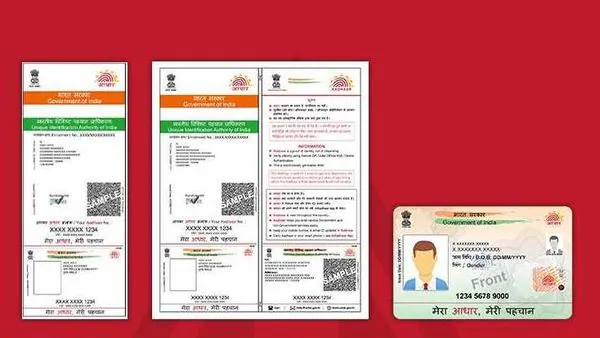
When most of us think of Aadhaar, we picture the physical document. This itself has had an evolution. For years, it was the long, foldable “Aadhaar letter” sent by UIDAI to your residential address via post after you enrolled. This was often laminated by people for durability.
More recently, UIDAI has also started offering a “PVC Card” option. This is a sleek, durable, credit-card-sized plastic card with your photo, details, and a secure QR code. You can order this from the UIDAI website for a nominal fee. Both the original letter and the new PVC card are physical, tangible versions of your Aadhaar identity. Their main purpose is to be carried in a wallet or file for in-person verification where needed. The core of the confusion isn’t this card, but its digital counterpart.
What is e-Aadhaar? (The Digital Twin)
This brings us to the e-Aadhaar. The “e” simply stands for electronic. The e-Aadhaar is an official, digitally signed, password-protected electronic copy of your Aadhaar card. It is generated and provided directly by UIDAI, the same government body that issues the physical card. You can download this file from the official myAadhaar portal. When you open this file (the Aadhaar card vs e-Aadhaar PDF), you’ll see an exact replica of the physical card, complete with your photo, name, address, and biometric details. This digital twin is the key to understanding the government’s push for digital identity.
The Big Question: Is e-Aadhaar a Valid Proof?
This is the single most important question, and we need to be crystal clear. The answer is an unequivocal, 100% YES. The Unique Identification Authority of India (UIDAI) has stated this repeatedly in official circulars. According to the law, e-Aadhaar is a legally valid and secure electronic form of Aadhaar and is to be accepted as a proof of identity and address *on par* with the physical Aadhaar card for all purposes. This is not a suggestion; it’s a rule. So, is e-Aadhaar a valid proof? Yes, it is. Any agency, bank, or institution that refuses to accept your e-Aadhaar (either as the downloaded PDF or in your official DigiLocker) is violating this government mandate.
So, What *Is* the Real Difference Between Aadhaar and e-Aadhaar?
Since we’ve established that the legal value is identical, the actual difference between Aadhaar and e-Aadhaar boils down to four key areas: form, convenience, security, and accessibility. The discussion of Aadhaar card vs e-Aadhaar PDF is really a discussion of these practical differences.
Form Factor (Physical vs. Digital)
This is the most obvious one. The physical Aadhaar is a tangible object—a piece of paper or plastic. You can touch it, put it in your wallet, or file it away. The e-Aadhaar is an electronic file (a PDF). It lives on your phone, computer, or in your secure DigiLocker. It has no physical form unless you choose to print it out. This is the main physical difference between Aadhaar and e-Aadhaar.
Accessibility and Convenience
This is where e-Aadhaar truly shines. Your physical card can be lost, stolen, damaged by rain, or simply forgotten at home. If you’re at an airport or a bank and suddenly need your ID, you’re out of luck. Your e-Aadhaar, however, lives in your phone. As long as you have your phone, you have your Aadhaar. You can download it as many times as you need from the UIDAI portal. This 24/7/365 accessibility makes the e-Aadhaar far more convenient for the modern, mobile citizen. This digital convenience is a core part of the Digital India initiative, which also aims to simplify other processes like the SBI KYC update online.
Security Features (This is a Big One)
This might be the most surprising part for many: the e-Aadhaar is, in many ways, more secure than the old physical letter. Here’s why:
- Password Protection: The e-Aadhaar PDF file you download is password-protected. It cannot be opened by anyone who doesn’t know your unique password (the first four letters of your name in CAPS + your year of birth). This adds a crucial layer of security if your phone is lost or stolen.
- Digital Signature: The e-Aadhaar is digitally signed by UIDAI. This is a cryptographic signature that verifies the document is authentic and has not been tampered with.
- Secure QR Code: This is the most powerful feature. The e-Aadhaar (and the newer PVC cards) contains a secure QR code. This isn’t just a simple QR code; it’s encrypted and contains your demographic details and photograph. An official can scan this code using a UIDAI-approved scanner to instantly verify that the Aadhaar is genuine. The old laminated paper letter has no such verifiable feature.
This makes the difference between Aadhaar and e-Aadhaar a major point in favor of the digital version for security. So, is e-Aadhaar a valid proof? Yes, and it’s also a more verifiable one.
How You Receive It
You receive your first physical Aadhaar letter via India Post, which can take weeks. You can download your e-Aadhaar from the official website *the moment* it is generated, often just days after your enrollment. This speed of access is another significant advantage. When you need to know how to download e-Aadhaar, you just need your enrollment ID or Aadhaar number.
How to Download e-Aadhaar (A Simple Guide)
If you don’t have your e-Aadhaar yet, getting it is incredibly simple. This simple process is why the Aadhaar card vs e-Aadhaar PDF debate is tilting towards digital. Here’s the straightforward, official method for how to download e-Aadhaar.
- Go to the Official Portal: Open your web browser and go to the official myAadhaar portal: myaadhaar.uidai.gov.in. Be very careful to use this official government site.
- Log In: Click on the “Login” button. You will need to enter your 12-digit Aadhaar number and the captcha code. An OTP (One-Time Password) will be sent to the mobile number you have registered with your Aadhaar.
- Enter the OTP: Enter the OTP you receive on your phone to log in to your personal Aadhaar dashboard.
- Find “Download Aadhaar”: On your dashboard, you will see a prominent option that says “Download Aadhaar.” Click on it.
- Review Your Details: The service will display your demographic details and photo. Confirm they are correct.
- Download the PDF: Click the “Download” button. The secure, password-protected e-Aadhaar PDF will be saved to your device.
The Final Hurdle: Your e-Aadhaar Password
You’ve downloaded the file, but it won’t open. It’s asking for a password! This is the most common point of confusion, but the solution is simple. The password is a combination of your name and your birth year.
The formula is: The first four letters of your name (in CAPITAL LETTERS) + your year of birth (in YYYY format).
Here are some examples:
- Your Name: SURESH KUMAR. Your Year of Birth: 1990. Your Password is: SURE1990
- Your Name: SAI RAM. Your Year of Birth: 1985. Your Password is: SAIR1985
- Your Name: P. KUMAR. Your Year of Birth: 2001. Your Password is: P.KU2001
- Your Name: RIYA. Your Year of Birth: 1995. Your Password is: RIYA1995
Once you enter this 8-character password, your e-Aadhaar will open. You can then save an unlocked copy or, even better, upload the locked file to your secure DigiLocker.
What About “Masked Aadhaar”?
When you are in the download section of the myAadhaar portal, you might see a small checkbox that says “Do you want a Masked Aadhaar?” This is another fantastic digital feature. A Masked Aadhaar is a version of the e-Aadhaar where the first 8 digits of your Aadhaar number are hidden and replaced with “XXXX-XXXX”. It only shows the last 4 digits. This is highly recommended for situations where you need to prove your identity or address but don’t want to reveal your full Aadhaar number, adding yet another layer of privacy and security.
Why This Matters for Your Digital Life
Understanding the difference between Aadhaar and e-Aadhaar is not just academic; it’s about embracing the digital-first ecosystem India is building. The government is pushing for all-digital interactions to improve services and reduce paperwork. Your e-Aadhaar is your key to this ecosystem.
This is the same philosophy behind other government mandates, like the one requiring you to update mobile number driving licence records. It’s all about creating a secure, verifiable digital identity to make services faster and more secure. The e-Aadhaar is the central, trusted document in this new digital world, and its acceptance is only going to grow.
Conclusion: One Identity, Multiple (and Smarter) Forms
So, what is the major difference between Aadhaar and e-Aadhaar? In terms of legal value, there is absolutely no difference. Both are equally valid. The real difference between Aadhaar and e-Aadhaar is in their form, convenience, and security. The physical card is a tangible token, but the e-Aadhaar is a dynamic, secure, and verifiable digital asset that lives on your phone, protected by a password and verifiable by a QR code. It’s the modern, more convenient, and often more secure version of your identity. As India continues to build its digital infrastructure, embracing your e-Aadhaar isn’t just a good idea—it’s the future. To manage your Aadhaar and download your e-Aadhaar, always use the official government portal: myaadhaar.uidai.gov.in.
Frequently Asked Questions (FAQ)
1. Is e-Aadhaar a valid proof of identity and address?
Yes, as per UIDAI, e-Aadhaar is a legally valid proof of identity and address, equivalent to the physical card for all purposes.
2. Do I need to get my e-Aadhaar printout notarized?
No, the e-Aadhaar is digitally signed by UIDAI and requires no further attestation or notarization to be valid.
3. What is the password for the e-Aadhaar PDF?
The password is 8 characters: the first 4 letters of your name in CAPITAL LETTERS, followed by your year of birth (YYYY).
4. How many times can I download e-Aadhaar?
You can download your e-Aadhaar as many times as you need; there is no limit.
5. What is the difference between e-Aadhaar and a Masked Aadhaar?
A Masked Aadhaar is a type of e-Aadhaar that hides the first 8 digits of your Aadhaar number, showing only the last 4 digits for enhanced privacy.
6. Can an agency refuse to accept my e-Aadhaar from DigiLocker?
No, documents in DigiLocker, including e-Aadhaar, are legally recognized as equivalent to original documents as per the IT Act, 2000.